

Contribution activity report for resource#
Get user activity report for a resource from the NextGIS Web server.
Works for one of the following resource types:
vector layer - you’ll get user activity for a particular layer;
resource group - all versioned vector layers within this group are analyzed;
Web Map - all versioned layers added to the map are analyzed.
Inputs:
NGW URL - Web GIS address (e.g., https://demo.nextgis.com);
Login - NextGIS ID or user login;
Password - password for that user;
Resource ID - numbers at the end of the resource URL;
Start date - optional. First day of the period, in YYYY-mm-dd format;
End date - optionsl. Last day of the period, in YYYY-mm-dd format, not less than 28 days and not over 366 days from the initial date.
Outputs:
HTML file with an interactive activity report.
Launch the tool: https://toolbox.nextgis.com/t/ngw_contribution_activity
Example:
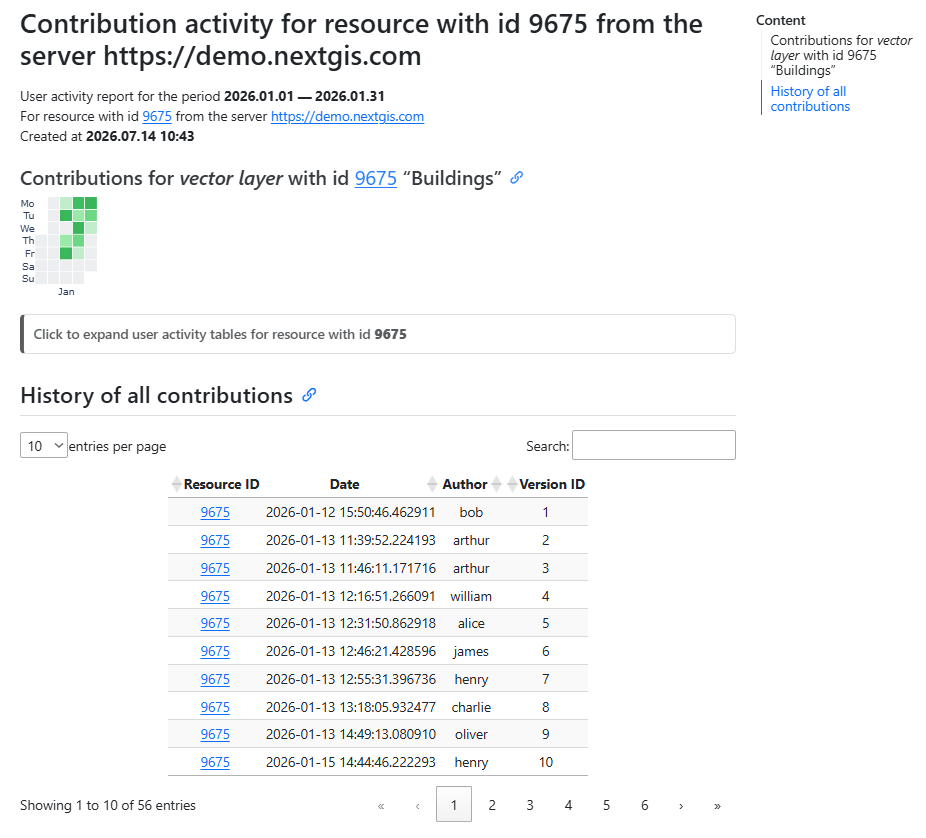
Fig. 200. Example output image#
Try the tool in action
Click on the Demo button above the tool form. The fields are filled in with demo values.
Click on the Run button.