

NextGIS Toolbox#
This plugin allows to access the NextGIS tools collection, also available online, directly from QGIS.
To install the plugin, go to Plugins -> Manage and install plugins. Type “NextGIS Toolbox” and click Install. After installation you’ll need to restart QGIS.
NextGIS Toolbox is available in the Processing panel as well as the Processing menu.
To use the tools you need to add your API key in the plugin settings.
API key#
Go to https://toolbox.nextgis.com and log in or create NextGIS ID account.
Open any tool on the front page of the Toolbox web site.
Go to the Python-code tab.
Your API key is indicated in the following section:
# Initialize client with your API key, use default base url
toolbox = ToolboxClient("{API_key}")
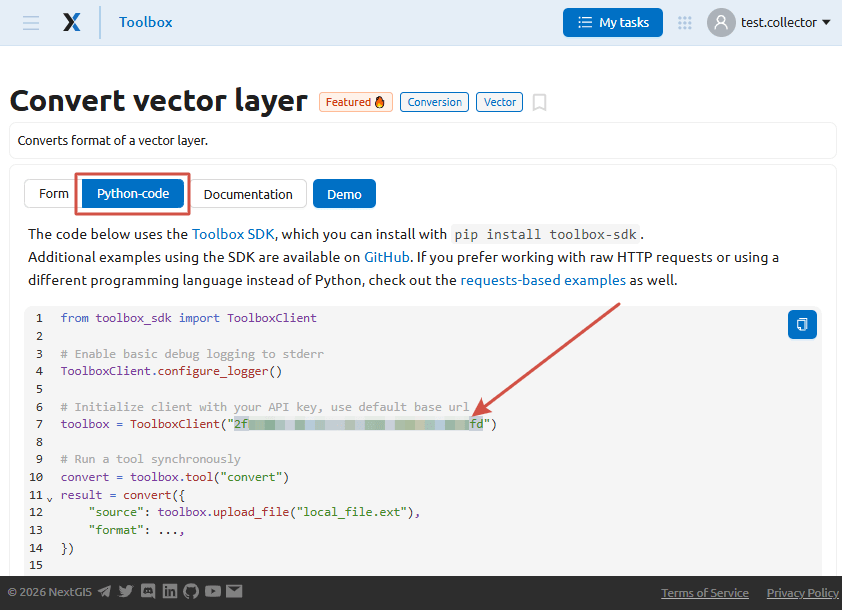
Fig. 888. API key in the Python tab#
Copy the key from the code and insert it in the plugin settings in QGIS: Processing -> NextGIS Toolbox -> Settings.
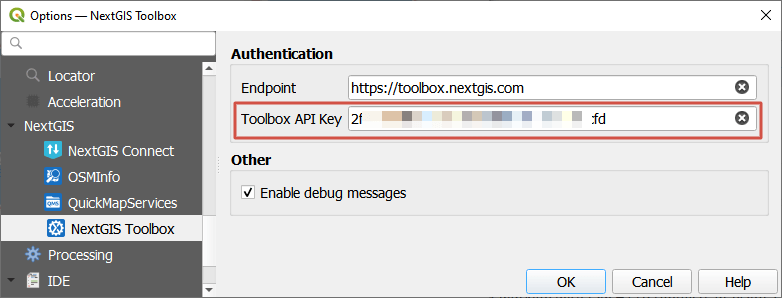
Fig. 889. API key added to the plugin settings#